Onsite Inspection Services

Project overview
Project Name: Onsite Inspection Services
Platform: Universal Windows Platform (UWP) application
Client/Industry: Energy sector, specifically for engineers performing quality inspections on energy plants.
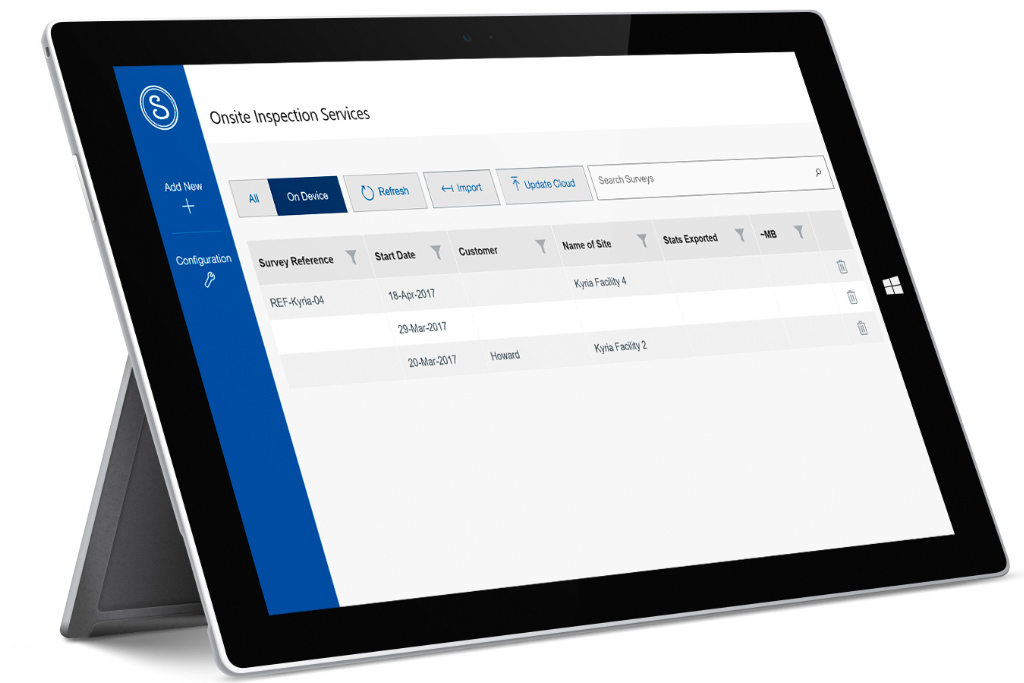
Led UX strategy and design for a complex engineering workflow initiative at Swagelok, focusing on improving how users navigate and complete technically demanding tasks in harsh real-life environments. Defined the problem space, identified high-value opportunities, and shaped product direction by streamlining user flows to reduce complexity and support more effective data-gathering.
Problem vs solution
Problem
The client lacked a digital solution for collecting quality survey data during onsite inspections. Engineers were relying on disparate methods, including various cameras and paper forms, leading to manual data processing, inefficiencies, and potential data loss. Inspections were often conducted in challenging environments (offshore, dark spaces, no Wi-Fi, using gloves), all of which called for a robust and user-friendly digital tool.
Solution
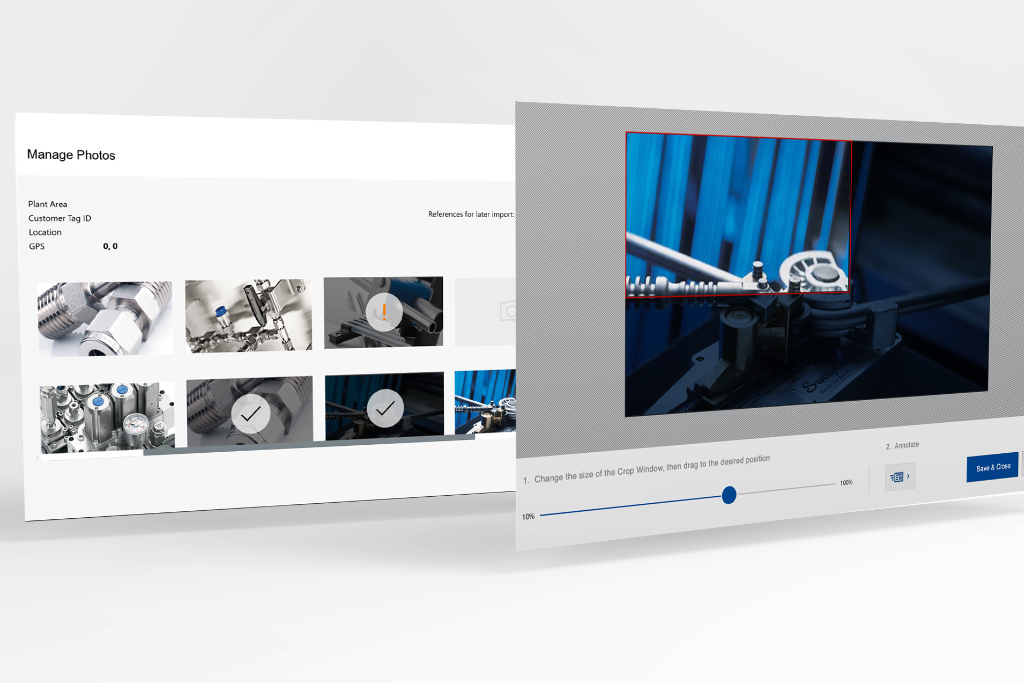
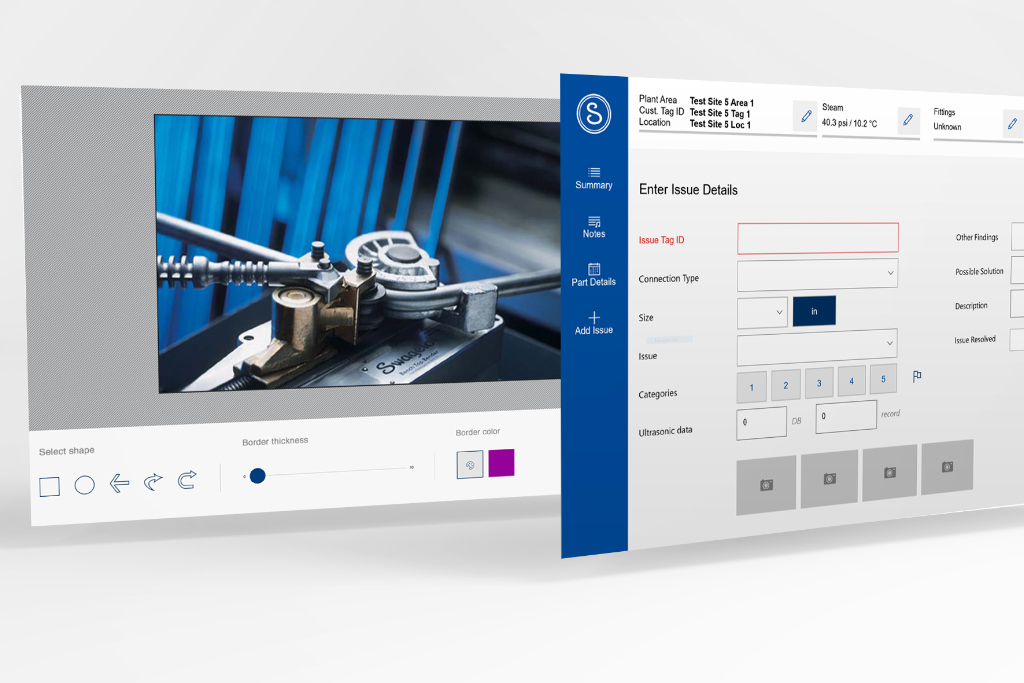
Development of a UWP application designed for intrinsically safe devices, enabling offline data collection, image uploads with annotation capabilities, and seamless synchronization when connectivity is available. The UI was optimized for difficult conditions with large input fields and buttons, and streamlined workflows to minimize errors and typing.
My role and duties
As the UX Designer for the Onsite Inspection Services project, my responsibilities encompassed the full spectrum of user experience design, from initial discovery to final UI implementation. My duties included:
Business Analysis & UX Research: Gathering comprehensive business requirements and conducting in-depth UX research, including the creation of personas and user scenarios to deeply understand the engineers' needs and workflows.
Interactive Wireframing & Usability Testing: Designing interactive wireframes using Axure to visualize user flows and conducting usability testing to validate design decisions and gather feedback iteratively.
UI Design & Brand Alignment: Collaboriating with the enginering team to assure the user interface in adherence to my design and established brand guidelines, ensuring a consistent and professional aesthetic.
UI Layout & Styles (XAML for UWP): Implementing UI layouts and styles using XAML, demonstrating a strong understanding of platform-specific development considerations.
Challenges
Analog processes in harsh environments
The core challenge was transforming a fragmented, analog data collection process into a seamless, efficient digital workflow. This was compounded by the unique and demanding environment in which the end-users — energy plant engineers — operated. Key challenges included:
Lack of Digital Data Collection: The existing business model relied heavily on paper forms and various cameras, resulting in a significant manual effort for data entry and processing. This was inefficient and prone to errors.
Disparate Data Sources: Information, notes, and photographic evidence of faults were collected from multiple, unintegrated sources, making consolidation and analysis difficult. It required engineers to add data into an internal system after the inspection was done, effectively doubling their efforts.
Manual Data Processing: The absence of digital capture meant that all collected data required manual transcription and processing, leading to delays and increased operational costs.
Challenging Work Conditions: Engineers performed inspections in offshore locations, dark and confined spaces, exposed to weather elements, and often while wearing gloves. Crucially, these environments frequently lacked Wi-Fi connectivity.
Hardware Constraints: The need for a device that could withstand harsh industrial environments and be intrinsically safe for energy plant use.
Solutions
A robust, user-centric UWP Application
The solution involved designing and developing a Universal Windows Platform (UWP) application tailored to the specific needs of the energy plant engineers and the operational environment. The design focused on resilience, usability, and efficiency.
Hardware Selection: An intrinsically safe rugged Windows-based device was chosen to accommodate the rough conditions, ensuring the app could be used reliably and safely in the demanding energy plant environment.
Offline-First Data Collection: The application was engineered to allow data collection offline, storing information locally on the device. This addressed the challenge of intermittent or absent Wi-Fi connectivity in remote inspection sites.
Seamless Data Synchronization: When an internet connection became available, the app facilitated automatic synchronization, uploading collected data and downloading necessary content, thereby eliminating manual data transfer and ensuring data integrity.
Optimized UI for Harsh Conditions: The user interface was designed with ample space for data input, featuring wide buttons and large input fields. This design choice minimized input errors, especially when engineers were wearing gloves or operating in low-light conditions.
Streamlined Workflow & Smart Inputs: The UI flow incorporated selection lists of suggested notes for common scenarios, significantly reducing the need for manual typing and accelerating the inspection process.
Integrated Image Capture & Annotation: Functionality was developed to allow engineers to take new images directly within the app or upload existing ones from non-built-in cameras. Crucially, an annotation feature enabled precise marking and detailing of faults on images, enhancing clarity and accuracy.
Design process
The design process for the Onsite Inspection Services application was iterative and deeply rooted in user-centered design principles:
Discovery & Research: Initial phases involved extensive business analysis and UX research. This included Webex meetings to gather business requirements and a thorough study of existing reports to understand the data points that needed to be collected. A site visit was conducted to observe engineers in their actual work environment, providing invaluable insights into their workflows, pain points, and environmental constraints.
User Flow & Wireframing: Based on research, user personas and scenarios were developed to map out the ideal user journey. Interactive wireframes were then created in Axure, allowing for early visualization and testing of the proposed workflows and interface elements.
UI Design & Prototyping: The wireframes evolved into high-fidelity UI designs, adhering to brand guidelines and leveraging XAML for UWP to ensure native platform aesthetics and functionality. Prototypes were developed to simulate the application's behavior.
Usability Testing & Iteration: Continuous usability testing with Swagelok engineers (or representatives) was conducted to gather feedback on the interactive wireframes and prototypes. This iterative feedback loop ensured that the final design was intuitive, efficient, and met the needs of the users in their challenging work conditions.
Impact and outcomes
The Onsite Inspection Services application significantly improved the client's quality inspection process, leading to several key benefits:
Increased Efficiency: By digitizing data collection and streamlining workflows, the app drastically reduced the time and effort previously spent on manual data entry and processing, at least by 50%.
Improved Data Accuracy & Integrity: The standardized digital input, offline capabilities, and direct image annotation minimized errors and ensured a more consistent and reliable dataset for quality control.
Enhanced Operational Visibility: Centralized digital data provided better oversight of inspection results, equipment status, and fault reporting, enabling more informed decision-making.
Empowered Field Engineers: The robust, user-friendly design tailored for harsh environments empowered engineers to perform their duties more effectively and safely, reducing frustration and improving job satisfaction.
Key learnings
This project underscored the critical importance of contextual inquiry and empathy in design, particularly for users operating in extreme environments. Understanding the physical constraints (gloves, no Wi-Fi, darkness) was as crucial as understanding the inspection workflow. The project also highlighted the value of platform-specific design considerations (UWP, XAML) to deliver a truly native and performant experience, and the power of offline-first design for mission-critical applications in disconnected settings.